


Back in June, Apple announced a new set of creative opportunities across the App Store, including Search Results and Product Page Headers.
Together, they give apps and games greater control over two important moments in the user journey: what someone sees when they discover an app in Search, and the first impression they get when they land on its product page.
With Product Page Headers, brands can use a prominent image or video at the top of the page to express their identity, highlight new or seasonal content and set the tone for the rest of the experience.
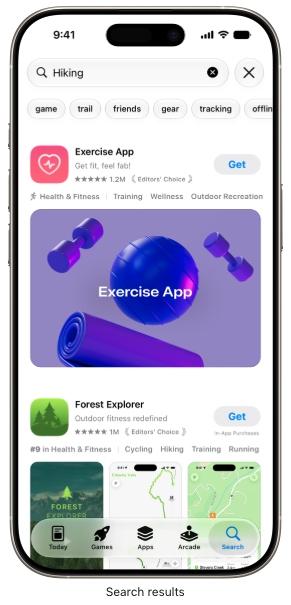
Search Result assets create a different opportunity. Rather than relying on the app previews and screenshots that would ordinarily appear in Search, marketers can introduce dedicated creative designed specifically to capture attention and communicate the app’s value before someone reaches the product page.
On the surface, these might look like two more formats to add to the ASO checklist. But the opportunity is bigger than that.
They provide more valuable creative real estate, more control over the journey from discovery to download and, crucially, more opportunities to test and learn what makes users act.
What are Product Page Headers?
Product Page Headers are new image or video assets that sit at the top of an app or game’s product page.
Apple suggests using them to express your brand, highlight seasonal offerings, showcase new content or introduce another compelling message. As the first visual element someone sees when they land on the page, the header can shape how the rest of the listing is perceived.
That makes it a valuable new piece of App Store real estate.
Someone arriving on your product page has already taken a meaningful step towards downloading. The header gives you another opportunity to reinforce why they should continue.

What are Search Result assets?
Search Result assets appear earlier in the journey, when someone discovers an app or game through Search.
By default, Apple can show app previews and screenshots alongside a search result. The new placement allows marketers to use a dedicated image or video instead, creating greater freedom to develop something more editorial, distinctive and brand led.
Apple recommends making the app’s purpose immediately obvious and showing elements such as its interface, content or gameplay so people can quickly decide whether it is relevant to them.
This gives Search Result creative a different role from the Product Page Header.
The Search Result asset needs to win attention and communicate value quickly. The Product Page Header can then build on that initial promise once someone reaches the listing.
Both need to work individually, but the strongest approach will consider how they work together.
Why these new assets matter for ASO
For years, ASO has often been discussed through the lens of keywords, rankings, metadata and visibility.
Those things remain important, but creative optimisation has become an increasingly significant part of App Store performance.
It also affects more than organic traffic. Every visitor arriving from paid advertising, social media, a website or another acquisition channel encounters the product page creative. A stronger conversion experience can help more of that existing traffic turn into downloads, making paid investment work harder and reducing effective acquisition costs.
Getting someone onto the product page is only part of the challenge. Once they arrive, the creative needs to show that the app is relevant, valuable and worth downloading.
Product Page Headers add a large, highly visible touchpoint to that journey. Search Result assets give marketers greater control at the stage before it.
The creative might focus on:
- A key product benefit
- A distinctive element of your brand
- A major feature or launch
- Seasonal content
- New gameplay or experiences
- A clear demonstration of what makes your app different
The important part is deciding what job each asset needs to do.
Give the header one clear job
Apple advises marketers to focus each Product Page Header on a single idea, as visually dense or cluttered assets are likely to dilute its impact.
That sounds simple, but a large new placement can quickly become a battleground for every feature, campaign message, value proposition and stakeholder priority.
Trying to include all of them is unlikely to create the strongest first impression.
Before design begins, agree on the main thing you want someone to understand or feel when they see the header.
That could be the app’s core proposition, a standout feature, a seasonal moment or a distinctive expression of the brand.
Whatever you choose, the asset needs a clear purpose. If someone cannot tell what to look at or take away from it, the creative is trying to do too much.
Make sense to someone discovering you for the first time
Apple also recommends designing Product Page Headers with first-time visitors in mind.
Marketing and product teams spend every day immersed in their app. They understand its features, terminology and value proposition. Someone discovering it in the App Store does not have that context.
The creative needs to make sense without explanation.
Would someone unfamiliar with the brand understand what the app offers? Is the benefit clear? Are you prioritising something that will matter to the user, or something that mainly matters internally?
The strongest creative will balance distinctive branding with immediate comprehension.
Build one connected creative journey
Product Page Headers and Search Result assets should not be designed as isolated placements.
Together, they allow marketers to create a clearer journey:
Search Result creative → Product Page Header → Download
The Search Result asset might introduce the app’s purpose and give someone a reason to tap. The header can reinforce that promise, while the screenshots and previews provide more detail about the experience.
Apple also allows developers to use the same approved creative across Product Page Headers and Search Results. For some brands, a universal asset could create consistency and strengthen recognition throughout the App Store.
For others, the two placements may need to perform different jobs.
A Search Result asset might focus on quickly communicating utility, while the Product Page Header uses more emotive or brand-led creative. Alternatively, a campaign may benefit from one recognisable visual carried across both placements.
There is no universal answer. The right approach depends on the audience, proposition and role of each asset within the journey.
Treat the launch as a testing opportunity
The temptation with any new format is to choose a design, publish it and move on.
That would miss one of the most valuable parts of this update.
Apple allows marketers to use Product Page Optimisation to test alternative visuals and see which approach performs most effectively. Instead of treating the header as a one-off production task, brands can build clear creative hypotheses around it.
For example:
- Brand-led creative versus product-led creative
- Feature messaging versus benefit messaging
- Interface-led creative versus a more emotive visual
- Evergreen messaging versus seasonal creative
- Different visual treatments of the same proposition
The variants need to be meaningfully different.
A minor colour change may produce a winner, but it will not necessarily provide a useful strategic learning. Testing different ideas can help teams understand not only which asset performs best, but which messages and creative approaches resonate with App Store visitors.
Those findings can then inform screenshots, paid creative, Custom Product Pages and the wider app marketing strategy.
How should app marketers prepare?
The arrival of Product Page Headers and Search Result assets does not mean every brand needs to immediately redesign its entire App Store presence.
It does create a useful opportunity to review how the current creative journey works and where these placements could add value.
We recommend starting with five questions:
- What is the most important message you want to communicate? Choose one clear idea for the header rather than attempting to include every feature and benefit.
- What role should each asset play? Decide what someone needs to understand in Search and how the Product Page Header should build on that message.
- Does your App Store creative tell one cohesive story? Review the new assets alongside the app icon, screenshots, app previews and wider acquisition creative.
- Which ideas are worth testing? Develop genuinely different creative routes rather than automatically committing to the first concept.
- How will you use the results? Look beyond selecting a winning header. Use the findings to improve the wider App Store and acquisition strategy.
Look beyond selecting a winning header. Use the findings to improve the wider App Store and acquisition strategy.
Our recommended approach is to develop one control Product Page Header, three meaningful header variants and a dedicated Search Result asset, combining creative production with a testing strategy from the outset.
More creative control across the App Store
The App Store is already an intensely visual environment.
What Product Page Headers and Search Result assets change is the amount of control marketers have over that experience.
Search Result creative creates a new opportunity at the point of discovery. Product Page Headers introduce a prominent new canvas at the top of the listing. Product Page Optimisation allows marketers to test what resonates rather than relying on instinct alone.
Together, they give apps and games more ways to shape the journey from discovery to download.
The brands that benefit most will not necessarily be those with the most polished individual asset. They will be those that understand the role each placement plays, develop creative with a clear purpose and continue learning from how users respond.
Ready to make the most of Apple’s new creative assets?
Product Page Headers and Search Result assets create new opportunities to improve how your app is discovered, understood and converted on the App Store.
If you want help developing the right creative strategy, producing meaningful test variants and understanding how these new placements should fit into your wider ASO approach, get in touch with the Yodel Mobile team.











5 minute read
A history of app marketing, as told by a founder who was there before day one
Mick Rigby