

Apple Ads has become one of the most effective ways to reach users at the exact moment they’re looking for an app like yours. With over 850 million people visiting the App Store each week, and roughly 65% of downloads happening straight after a search, the intent is already there. The question is whether your strategy is structured to capture it efficiently.
But a high-performance Apple Ads strategy in 2026 isn’t about bidding on more keywords or simply spending more. It’s about building a system: one that scales reach while staying grounded in relevance, conversion, and defensibility, and that tightens the synergy between paid and organic.
This guide walks through that system step by step, from account structure and keyword strategy through to creative, bidding, ASO alignment, localisation, and the tooling that holds it all together. One shift makes this especially timely for 2026: the rollout of expanded search results placements.
Apple Ads has introduced additional placements within search results, with up to two ads now able to appear for a single query. Existing search results campaigns are automatically eligible – no new setup is required.
The practical effect is that more advertisers may now be eligible to appear on the same high-intent and branded searches. Maintaining strong creative relevance, a well-structured account, and consistent impression share monitoring on priority terms becomes more important as placements expand. Much of what follows is about building exactly that foundation.
Key takeaways
- Apple Ads now supports additional ad placements within search results, meaning up to two advertisers may appear on the same high-intent and branded searches, making creative relevance, account structure, and impression share monitoring more valuable levers than ever
- A high-performance account separates campaigns into four distinct types: brand, competitor, category, and discovery, to isolate performance, clarify reporting, and avoid overlap between campaigns across keyword themes.
- Custom product pages linked to specific keyword intent clusters consistently outperform the default ad creative, with tap-to-install conversion rate showing the largest lift at +5.9 percentage points according to AppTweak data
- Ranking #1 organically does not guarantee top placement on branded searches — competitors can appear above you on your own branded queries under expanded placements, making brand campaign investment a valuable safeguard in 2026
- Apple Ads and ASO should work as complimentary strategies: paid search data helps identify which keywords deserve organic metadata investment, and a stronger organic listing can contribute to stronger relevance, lowering cost-per-install for paid campaigns over time
- Localisation in Apple Ads is a strategic decision, not a translation task – keyword phrasing, visual conventions, and conversion rates vary by country or region and require independent bid and creative management
Structure your account around intent, not convenience
A well-organised account is the foundation for scalable, data-driven growth. When your structure mirrors how users actually move through discovery and aligns with your business goals, it becomes far easier to manage budgets, read performance, and apply learnings across markets. Without that clarity, even strong keywords and engaging creatives tend to underperform, leading to wasted spend and missed opportunities.
Keep separation clean: brand, generic, competitor, discovery
The most reliable structure separates campaigns into four types, each built around a single keyword theme:
- Brand: Keywords featuring your app or company name. These typically deliver the highest tap-through rate and the lowest cost-per-tap, thanks to the strong intent behind a branded search.
- Competitor: Keywords tied to rival apps, capturing users who are actively comparing options. Expect higher acquisition costs here.
- Category (generic): Broad, non-branded terms describing what your app does, used to reach people who don’t yet know your brand.
- Discovery: Built to surface new, untested keywords using broad match and Search Match.
Why this separation matters: it isolates performance, reduces overlap between campaigns, clarifies reporting, and enables cleaner bidding logic. Mixing themes in one campaign makes it almost impossible to tell what’s actually working and lets low-risk brand spend or exploratory discovery spend subtly divert budget from scalable category growth.
A practical guardrail: keep it simple until you have a reason not to. Resist over-segmentation until volume, geography, or creative testing genuinely justifies it.
Organise ad groups to isolate variables
Once campaigns map to your goals, ad groups are where you isolate the variables that drive performance. Separate match types where it improves visibility into what’s working -exact and broad behave differently, and splitting them makes performance legible at a glance.
Separate themes by user intent, too, so bids and custom product pages stay aligned: a user searching “budget planner app” is closer to installing than one searching “finance tools”, and your bids and creatives should reflect that.
Image placeholder: Diagram showing the four-campaign structure (brand, category, competitor, discovery), each broken into ad groups containing keywords and ad variants.
Build a keyword strategy that balances reach, relevance, and cost
Volume matters; but only if it converts at a cost you can defend. The strongest keyword strategies start from relevance and intent, then pressure-test for scale.
Start with relevance and search intent, then filter by scale potential
Begin by anchoring on terms that clearly match what your app does, since high relevance tends to translate into higher conversion rates and more efficient spend. Use intent as your lens: some queries signal “ready to install” while others signal browsing, and you’ll want to group and bid accordingly. Only then should you pressure-test with search volume and competition. High-volume terms drive impressions but are often more competitive and expensive, and balancing those factors is what keeps the strategy cost-efficient.
Use match types and Search Match as your reach-control system
Apple Ads gives you two keyword match types, plus a separate discovery feature. Together, they act as the dial that controls how widely you reach:
- Exact match – precision and efficiency for proven, high-intent terms, including brand. Best where you already know a term performs.
- Broad match – controlled expansion into synonyms, plurals, and related variations once you understand what converts.
Beyond these two match types, Search Match is Apple Ads’ discovery feature, which automatically matches your ad to relevant searches based on your app’s metadata, category, and related apps. Powerful, but use it intentionally and with guardrails (more on negatives below).
Keep continuous keyword research “on”, not “as a project”
Keyword performance shifts with competitors, seasonality, and market dynamics. Treating research as an ongoing habit rather than a one-off exercise is what keeps campaigns competitive.
The practical mechanic: harvest converting search terms from your discovery campaigns and move them into your core campaigns once they show consistent results. Then add those same terms as exact-match negatives in discovery to stop double-bidding.
Manage negatives to protect efficiency and avoid overlap
Negative keywords are a scalability tool, not just clean-up. Use them to exclude irrelevant modifiers -“free” or “for kids” where they don’t apply and to prevent internal duplication, stopping discovery campaigns from competing with your proven exact terms. Applied consistently, they preserve clarity as the account scales and new patterns emerge.
Expert tip: Add high-performing keywords from your core campaigns as exact-match negatives in your discovery campaigns. It’s the simplest way to avoid overlap with your core campaigns and keep discovery focused on genuinely new keyword opportunities.
Make creative relevance your competitive edge
Relevance is what wins the tap and the install. Custom product pages, alternative versions of your App Store page with tailored screenshots, previews, and text, are the most direct lever you have, and one of the most underused.
Custom product pages are a performance lever, not just a creative experiment
Most teams still treat custom product pages as one-off tests rather than a scaled, strategic asset. The shift worth making is to map custom product pages to keyword themes and intent clusters – one clear promise per page – and to align screenshots, messaging, and value props to the query that triggered the tap.
The data backs this up. AppTweak’s ASO trends and benchmarks report shows that ads linking to a custom product page consistently outperform the default page across TTR, tap-to-install conversion rate, and installs – with tap-to-install conversion rate showing the largest lift at 3.2 percentage points for apps and 2.8 for games.
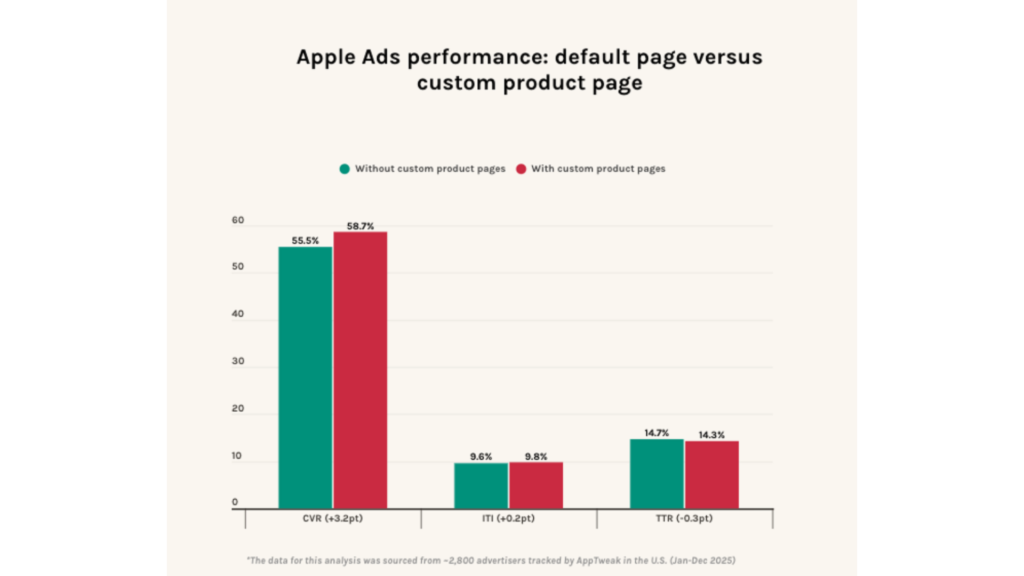
The pattern holds across campaign types. If your custom product pages are still being treated as one-off creative tests, that’s the gap worth closing first.
Why this matters more after expanded search results placements
With up to two ads now eligible for a single query, our data suggests that relevance often decides which one wins the tap. As more ads appear on high-intent queries, relevance plays a bigger role in winning the install – putting a premium on a higher tap-through rate to win the tap, a stronger conversion rate to win the install, and clearer differentiation to reduce drop-off to alternatives.
This is precisely why custom product pages move from “nice to have” to a core lever in 2026. When messaging and visuals reinforce the user’s intent, the experience feels more relevant – and conversion is more likely to follow, even as more ads appear on the same search.
What to test?
Keep testing strategic, not exhaustive. The highest-value variables:
- First screenshot message: outcome versus feature.
- Value framing for subscriptions: trial, savings, or a clear “why now”.
- Use-case-specific positioning: for your major keyword clusters.
A useful real-world example: SoundCloud built a custom product page for competitor campaigns that highlighted the ability to skip tracks freely and fewer ads than rivals. Linked to competitor-focused search ads, it drove a 58% increase in conversion rate and a 39% reduction in cost-per-install.
Consistency is non-negotiable. Your custom product page should be a genuine follow-through of your ad, not a bait-and-switch. Inconsistency erodes trust and, ultimately, conversion.
Bidding strategy: defend where it matters, scale what proves out
A strong structure is only as good as the bidding behind it. The aim is a data-driven, rule-based approach -not guesswork.
Segment bids by intent confidence
Not all keywords carry the same value, so bids shouldn’t be flat:
- Brand – bid to protect visibility.
- Proven high-intent generic – scale incrementally as performance holds.
- Competitor – test carefully; expect different efficiency dynamics and higher costs.
- Discovery – controlled exploration while you gather data.
A simple, durable bid formula to anchor decisions: Bid = Target CPA × Conversion Rate (CVR). If your target cost per acquisition (CPA) is $5 and your conversion rate is 20%, your bid lands around $1.
Optimise bids, don’t just pause keywords
If a term is strategically important, bid down before you kill the learnings. Use performance signals- cost-per-tap, conversion rate, cost-per-install, ROAS- to decide whether to adjust or retire a keyword. A couple of practical guardrails: adjust bids by around 20% at a time so you can read the effect, and base decisions on meaningful data (a keyword with only a handful of taps is noise, not signal).
Brand protection becomes non-negotiable in 2026
Here’s the reality many established brands underestimate: ranking #1 organically does not guarantee the top of the page. Expanded placements sharpen this. With more than one ad now able to appear on a branded query, users may see a competitor’s ad when searching for your app by name – exactly when intent is strongest.
So the more useful question isn’t “is brand spend 100% incremental?” but “what’s the risk of not protecting our brand visibility?” In competitive categories, going dark on your own brand search can mean lost traffic and a gradual drift of loyal users towards alternatives.
A structured brand defence typically combines dedicated brand campaigns, close monitoring of impression share for branded terms, and automated bid adjustments to maintain visibility.
One example: rather than treating brand as an on/off switch, The Economist used automated bid rules and custom product pages to fine-tune branded and high-intent coverage in real time, maintaining 90% impression share on high-intent and branded keywords and lifting downloads by 44% within a month.
Align Apple Ads and ASO into one growth system
The best teams don’t run paid and organic in separate lanes. Treated as one system, each strengthens the other in a continuous loop.
Let paid search validate which terms deserve organic investment
Apple Ads gives you fast, concrete data on which keywords actually convert. Use those signals to prioritise your metadata—title, subtitle, keyword field and to sharpen creative messaging. Reinforcing proven paid terms in your metadata can, in turn, support organic rankings. CPP learnings also feed back usefully into screenshot hierarchy and value-prop clarity.
Use ASO improvements to increase paid efficiency
At AppTweak, we’ve observed that a stronger, better-converting listing tends to lower your cost-per-install and increase how far the paid budget can scale. Consistent messaging from ad tap through to the product page reduces drop-off. And as organic visibility grows, your blended acquisition cost falls.
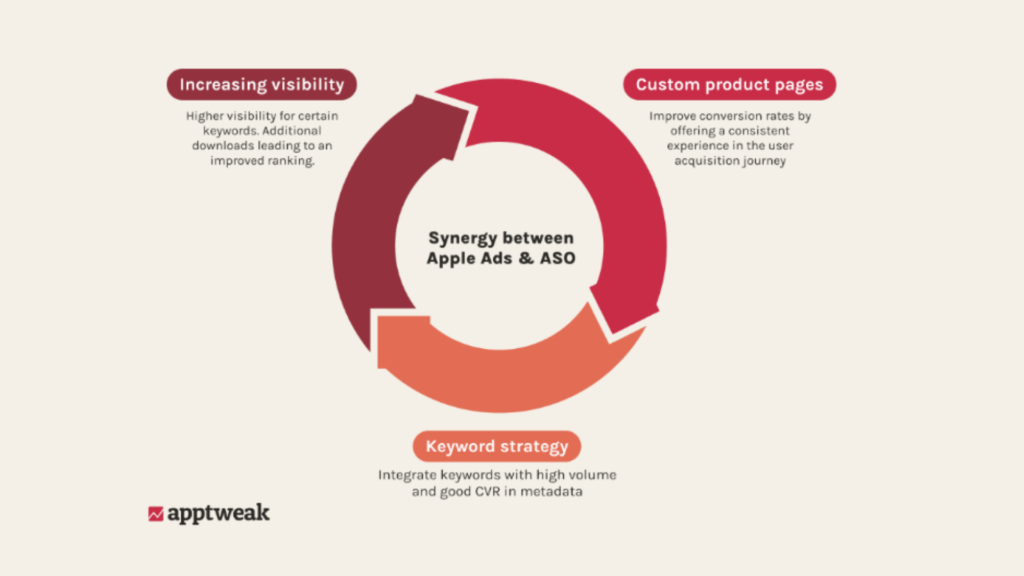
Caption: ASO builds relevance while Apple Ads can drive install velocity at critical moments, meaning that strong conversion often feeds organic performance.
Localise with intent, not just translation
A campaign that performs in the US won’t necessarily perform the same way in Japan, Germany, or Brazil. Localisation is a strategic lever, not a translation task -and it spans bids, creatives, and keyword choices.
Localisation is strategy, not just translation
Regional search behaviour shifts the distribution of intent: the keywords and phrasing users reach for differ by country or region, so “mindfulness app” in English may be better served by native-language equivalents elsewhere. Visual conventions differ too.
For example, by focusing on localisation, the Lithuanian dog-training app, Dogo, successfully expanded its app and moved into 221 markets.
Note: what performs in one country or region is rarely a safe default for another, which makes localisation so important.
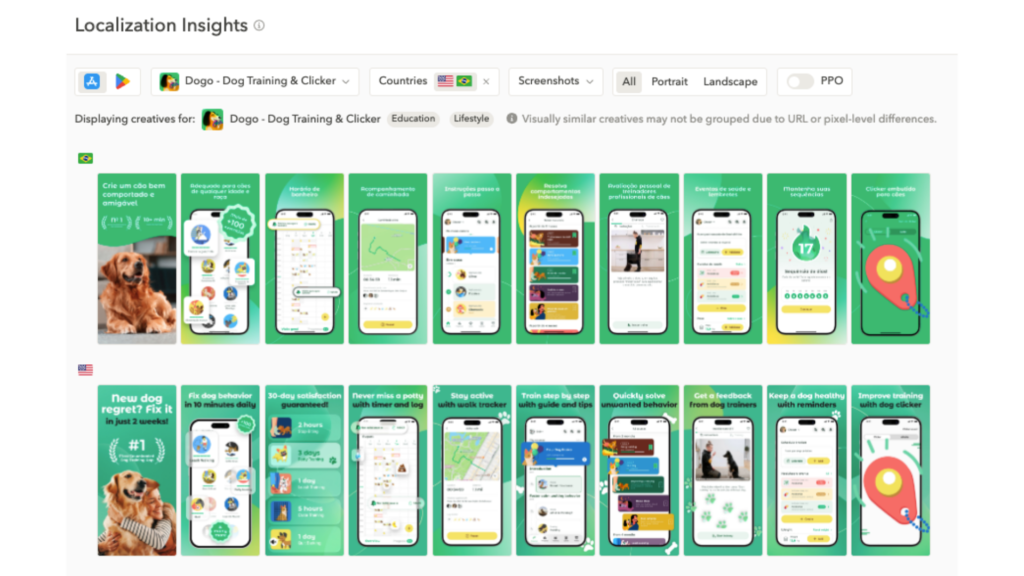
As seen in AppTweak’s Localisation Insights, Dogo localised its screenshots for Brazil and the U.S.
Manage by country or region performance
Treat each country or region on its own terms. Monitor cost-per-tap, cost-per-install, and tap-to-install conversion rate by country or region, then adjust bids and custom product pages to match regional preferences and competition – raising bids where ROAS is strongest and trimming spend where it isn’t.
Execution requires the right technology stack
Strategy drives outcomes, but execution depends on the right tooling and measurement layer. At a high level, the stack has three parts.
Native: the Apple Ads platform
Apple’s own tools handle campaign creation, core reporting, cost-per-tap pricing, and baseline optimisation. For many teams, especially those in earlier growth stages, the native platform delivers everything needed to run effective, well-structured campaigns.
Campaign Manager for Apple Ads by AppTweak
As accounts grow across countries or regions, match types, and apps, managing campaigns efficiently becomes more complex. Campaign Manager for Apple Ads by AppTweak, an Apple Ads Partner, brings the pieces into one place: keyword discovery, competitive intelligence, custom product page insights, and automation rules that support optimisation at scale.
Automation rules tend to organise around three goals – optimise (push budget to efficient keywords, pull back on saturated ones), protect (hold impression share on critical terms), and monitor (alert on budget saturation or CPA spikes). For teams managing larger accounts, Smart Bidding adjusts bids continuously toward a target CPA, and Ad Agent surfaces recommendations based on live campaign data, all within a workflow that keeps ASO and Apple Ads aligned.
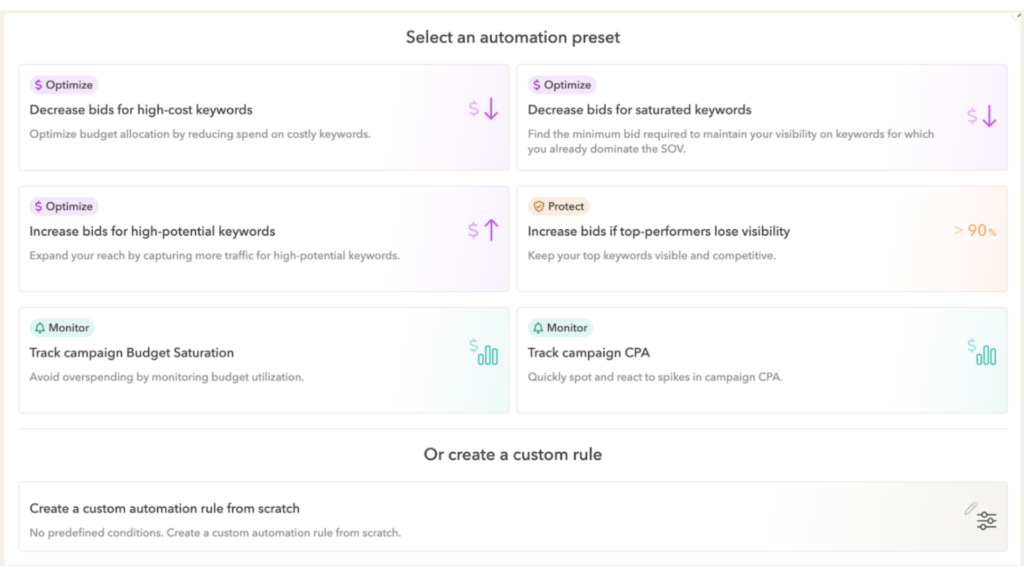
Caption: In AppTweak’s Campaign Manager, you can choose from preset automation rules or create a custom rule for smart bid management.
A practical example: pairing a rule that raises bids when impression share on a key term drops below 90% with one that lowers bids once share climbs back above it finds the “sweet spot” bid strong visibility at the lowest sustainable cost.
Explore AppTweak’s Campaign Manager for Apple Ads
Expert tip: Start safe. Apply monitor-only rules across your campaigns first – they alert without changing anything – then layer in optimisation rules once you’re comfortable with how automation behaves.
Measurement: your MMP
A mobile measurement partner (MMP) closes the loop on what happens after the install – post-install events, revenue, and retention cohorts. Connecting MMP data lets you optimise towards genuine downstream value (subscriptions, purchases) rather than installs alone, and validates which keywords are truly worth scaling.
Yodel Mobile’s perspective: where Apple Ads strategies break down
Apple Ads strategies usually break down when advertisers treat the channel as an install driver, rather than a performance channel that needs to be structured around intent, relevance and post-install value.
With Apple now able to show additional ad placements within search results, advertisers have more opportunities to reach contextually relevant prospects, and a stronger incentive to prove that visibility is translating into meaningful growth. For brands taking a more pragmatic approach to viewability, the second ad unit can create opportunities to access lower CPIs, which, when performance holds beyond the install, can back out to stronger CPAs and higher ROAS.
One of the clearest points of breakdown is campaign structure, because Brand, Competitor, Category and Discovery campaigns all serve different roles and should not be measured or optimised in the same way. By building keyword-specific campaigns around intent, advertisers can distribute budget more accurately, understand performance more clearly, and take greater control over targeting, bidding and the user journey.
Relevance is another area where weak Apple Ads strategies quickly become inefficient, as exact match, high-intent keywords should be treated as a non-negotiable foundation rather than an optional optimisation layer. Broad match can still play a useful role when managed carefully, but without disciplined negative keyword management and regular search term analysis, spend can quickly move away from the queries most likely to convert. It is also worth remembering that any search query prompt recommended by Apple is likely to be a potential volume driver, which can be particularly useful when building and scaling competitor campaigns.
Ultimately, Apple Ads strategies break down when success is measured too narrowly and advertisers optimise around CPI without understanding what happens after the install. Performance needs to be assessed against the metrics that matter for the app, whether that means onboarding completion, CPA, purchases, cohort retention or longer-term value. From the same level of investment, 100 installs that generate 20 purchases are far more valuable than 1,000 installs that generate 10, which is why the strongest Apple Ads strategies connect intent, creative, localisation and post-install performance into one joined-up view of growth.
Conclusion
Apple Ads’ success in 2026 is not about more keywords or more spend. It is about building a system that scales reach while staying grounded in relevance, conversion, and defensibility. The teams that win are the ones tightening the connections between Apple Ads and ASO at every step, so each channel makes the other more efficient.
That means structuring your campaigns around intent and keeping brand, competitor, category, and discovery separate so you can see what is actually driving performance. It means balancing reach, relevance, and cost by starting with intent, then filtering for scale, using match types as your reach dial, and negative keywords to keep that reach controlled as you grow.
Creative is where many campaigns find their edge. Mapping custom product pages to intent clusters tends to lift conversion across every campaign type, not just one. On bidding, segment by intent confidence, adjust before you pause, and treat brand protection as non-negotiable.
Above all, run paid and organic as one system. Paid validates which terms deserve organic investment, and our data shows that stronger ASO can lower your paid costs over time. Localise with intent, managing bids and custom product pages by country or region performance, and back it all with the right stack: native Apple Ads, AppTweak’s Campaign Manager for Apple Ads, and a mobile measurement partner for downstream measurement.
FAQs
What is Apple Ads and how does it work in the App Store?
Apple Ads is Apple’s native advertising platform that places paid placements directly within the App Store. Ads appear in search results, the Today tab, product pages, and other App Store surfaces. When a user searches for an app, Apple Ads can match relevant ads to that query and display them at the top of results. Advertisers pay on a cost-per-tap model, setting bids for specific keywords under different match types. With over 850 million people visiting the App Store each week and roughly 65% of downloads occurring immediately after a search, Apple Ads targets users at a high-intent moment in the discovery process.
How should I structure an Apple Ads account for best performance?
The most reliable Apple Ads account structure separates campaigns into four types based on keyword intent: brand, competitor, category (generic), and discovery. Each campaign type targets a distinct audience and requires different bidding logic. Brand campaigns capture users searching your app name and typically deliver the lowest cost-per-tap. Competitor campaigns reach users comparing alternatives. Category campaigns address broad non-branded searches. Discovery campaigns use broad match and Search Match to surface new keyword opportunities. Keeping these separate prevents budget overlap, clarifies reporting, and makes it easier to apply learnings as accounts scale.
What are custom product pages and why do they matter for Apple Ads?
Custom product pages are alternate versions of your App Store listing with tailored screenshots, previews, and text, and they can be linked directly to specific Apple Ads campaigns. When ads point to a custom product page aligned to the keyword intent that triggered the tap, conversion rates improve significantly. AppTweak data shows ads linked to a custom product page outperform the default listing across tap-through rate, tap-to-install conversion rate, and installs, with tap-to-install conversion rate showing a +5.9 percentage point lift. For example, SoundCloud used a competitor-focused custom product page to achieve a 58% increase in conversion rate and a 39% reduction in cost-per-install.
Does organic App Store ranking protect against competitors on branded searches?
No. Ranking #1 organically does not guarantee the top position on your own branded queries. A competitor’s ad can still appear above your organic result on branded searches. A structured brand defence combines dedicated brand campaigns, impression share monitoring on branded terms, and automated bid rules to hold visibility, without relying on organic ranking alone.
How does expanded search results placement in 2026 change Apple Ads strategy?
Apple Ads now supports one additional ad placement within search results, meaning up to two ads may appear for a single query in high-intent and branded searches. No account changes are required, as existing campaigns are automatically eligible. As more queries surface two ads instead of one, creative relevance, impression share monitoring, and strong account structure become more important. When both ads appear for the same query, relevance often determines which one wins the tap. Advertisers who invest in custom product pages aligned to keyword intent, maintain brand campaign coverage, and monitor impression share on priority terms are better positioned to maintain performance as placements expand