
WWDC 2026 may have been dominated by conversations around Apple Intelligence, Siri and the next phase of iOS, but for app marketers, some of the most important updates are happening inside the App Store.
As Apple announced lots of exciting new software and service updates, we take a closer look at the latest changes impacting your app store optimisation strategy, offering up our hot off the press ASO tips.
Product page headers are becoming a major conversion space
One of the more significant App Store updates announced at WWDC 2026 was the expanded use of product page headers through the new Creative Assets framework.
As the product header sits at the very top of the App Store product page, it’s one of the first things a user sees when they land on an app listing. New product page headers will take up roughly 25% to 30% of the starting product page experience, making them a major new conversion surface rather than a simple visual addition.
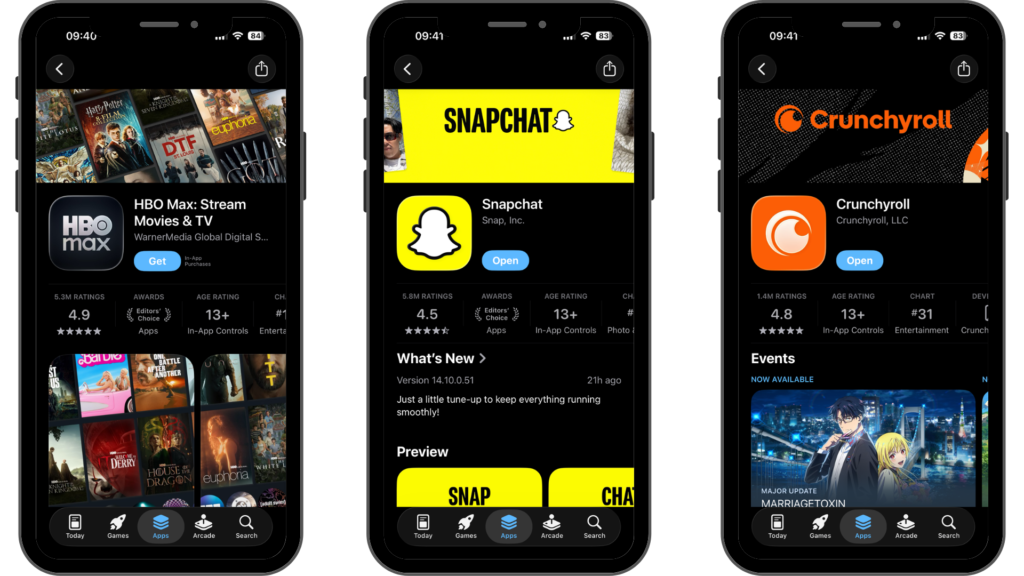
Until now, this kind of header placement has largely been associated with major apps with access to App Store presentation formats.
The product header presents a fresh communication moment, before users even reach screenshots. It can be used to reinforce brand identity, highlight seasonal campaigns, promote key features, support category positioning or create a stronger emotional reason to continue down the page.
Perhaps the most powerful aspect of this update is that Apple has confirmed these new assets can work with both Custom Product Pages and Product Page Optimisation.
This opens up more strategic possibilities for campaign-specific journeys, with Apple highlighting how this update will ‘help developers grow their businesses and reach new users’. A travel app could align its product page header with destination-focused campaigns, a fitness app could tailor creative around specific workout types, and a finance app could use the space to speak directly to money transfer, budgeting or savings intents.
Personalised Recommendations create another route into browse discovery
Apple also announced Personalised Collections on the App Store, which will recommend apps and games based on user interests, app usage, downloads and other App Store information.
For app marketers, this introduces another route into browse discovery. Apple has always featured editorial collections and curated placements, but this update means discovery is more personalised to the individual user. Instead of relying solely on charts, search behaviour, or broad editorial lists, users can now view specific collections, detailing why a specific app is relevant to them.
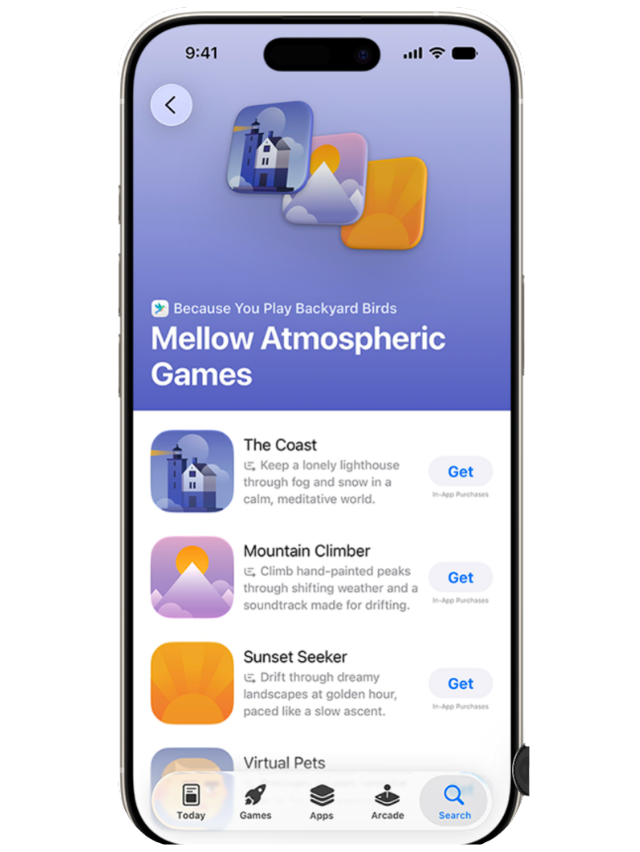
Which apps are affected?
This could have the greatest impact for categories where users frequently compare alternatives or use multiple apps for similar needs. Gaming is the most obvious example, with users regularly switching between titles based on genre, recommendations, or changing interests. Fitness is another category to watch, particularly as users evaluate different apps for workouts, nutrition, calorie tracking, and overall wellness. Language learning apps, dating apps, health apps and money transfer apps could also see an impact. When it comes to these categories, our intent is clear, but loyalty is not always fixed. Someone using one language app may still be open to another teaching style. Someone using one dating app may still explore another audience or proposition. Someone using one money transfer app may still compare alternatives based on speed, price, trust or location coverage.
In terms of our ASO tips: The opportunity here is not just to rank for keywords, but to be recognised as relevant within a wider user intent. App tags, metadata, creative assets, category positioning and product messaging all need to clearly communicate what the app does, who it serves and why it is worth recommending.
Sherlocking raises the pressure on apps to prove premium value
Sherlocking refers to building functionality directly into the operating system that overlaps with features previously offered by third-party apps. When that happens, some apps can lose their core differentiation, especially if they are built around a single utility that Apple can now provide natively.
This is particularly relevant as Apple continues to integrate more intelligence and automation into everyday iPhone, iPad and Mac experiences. If native Apple features begin to cover basic use cases, third-party apps in these spaces will need to work harder to justify their value.
Some of the app categories that could feel this pressure the most include:
- Writing and productivity apps, where native AI features can support drafting, rewriting, summarising and organising everyday tasks.
- Transcription and voice note apps, where system-level speech-to-text, formatting and clean-up tools can reduce the need for standalone utilities.
- Image editing and photo enhancement apps, where Apple’s native photo tools can start to cover basic editing, clean-up and visual adjustment features.
- Search and content organisation apps, where a smarter system search can help users find information across photos, files, mail and on-device content.
- Translation and language utility apps, where native translation features can make basic text and conversation translation more accessible.
- Password, security and authentication apps, where built-in Apple tools can reduce reliance on simple password storage or verification features.
- Note-taking and document management apps, where improved native organisation, summarisation and file search can overlap with lightweight productivity tools.
- Calendar, reminders and task management apps, where Apple’s own productivity ecosystem can absorb more planning, scheduling and automation features.
- Basic wellness and health tracking apps, where native Apple Health and Apple Watch functionality can cover more everyday tracking use cases.
For app marketers, this presents a positioning challenge as much as a product challenge. As Apple incorporates more common app features into its own ecosystem, the value proposition highlighted on an App Store listing needs to extend beyond basic functionality.
Our next ASO tip: Apps need to communicate what makes them meaningfully better. This might be deeper personalisation, professional-grade tools, stronger creative control, workflow integrations, collaboration features, niche expertise, community, analytics or outputs that go beyond what the native system can offer.
This is especially important for subscription apps, as users may be less willing to pay for features they can access through a simple native alternative for free. Paid apps need to make the premium benefit obvious from the first impression, with product page headers, screenshots, app previews, onboarding and cancellation messaging all reinforcing why the app still deserves payment and continued use.
Subscription Bundles open a new partnership route
Apple also announced new Subscription Bundles and Suites, giving developers more ways to package subscription value through Apple In-App Purchase.
This could become an important monetisation and partnership opportunity, but it will not be proportionately useful for each app. The strongest use cases will be where apps have overlapping audiences, complementary use cases or a clear combined value proposition.
The obvious comparison is streaming. If users can access multiple entertainment services through one bundled price, the perceived value becomes stronger, and the reason to cancel may become weaker. That same logic could apply to app categories where users naturally need more than one product.
For example, a creator-focused editing app could partner with a publishing or scheduling tool, giving users a clearer workflow from creation to distribution. A photography app could partner with an app that helps users publish, organise or monetise their content. A group of productivity apps could bundle together if each product solves a different part of the same user problem.
Our next ASO tip: A bundle only works if the connection is obvious. If two apps do not serve the same audience or support the same journey, a bundle may feel confusing rather than valuable.
For larger companies with multiple apps, this could become a strong cross-sell and retention mechanism. For smaller developers, it could create selective partnership opportunities, but only where there is genuine audience overlap and a clear reason for users to want both products together.
Retention Messaging creates a new cancellation-stage opportunity
Apple’s Retention Messaging update is another important change for subscription apps.
With Retention Messaging, developers will be able to show users additional messaging during the subscription cancellation flow, including value-led copy, imagery and special offers. This gives marketers a native opportunity to influence users at one of the most commercially important moments in the subscription lifecycle.
An important ASO tip: Try not to treat Retention Messaging as a last-minute save. The best Retention Messaging will be centred around a clear understanding of why users cancel.
If users are cancelling because they do not understand the value, the message should reinforce the benefits they are losing. If price is the issue, a special offer or alternative plan may be more effective. If the app is seasonal, the message could encourage users to stay subscribed for upcoming moments of value. If usage has dropped, the message should reconnect users with a relevant feature or outcome.
This opens up a new optimisation area for subscription marketers. Copy, imagery, offers, timing and audience segmentation will all matter. Retention Messaging is best planned alongside onboarding, lifecycle communications, in-app messaging and win-back strategies, rather than being treated as a separate App Store Connect setting.
Priorities for app marketers
The biggest shift seen from WWDC 2026 is that Apple is giving app marketers more control over key moments in the App Store journey.
Discovery is becoming more personalised, which means apps need clearer positioning and stronger relevance signals.
Conversion is becoming more visual, which means product page headers and search result creative assets need to become part of creative testing and App Store conversion rate optimisation.
Monetisation is becoming more flexible, which means subscription apps should consider whether bundles, suites, group purchases or new retention tools could support growth.
Retention is becoming more actionable inside the Apple ecosystem, which means cancellation messaging can now play a more active role in protecting subscriber revenue.
At the same time, Sherlocking is a reminder that apps cannot rely too heavily on basic utility features. As Apple adds more native functionality into its platforms, apps need to communicate premium value, deeper differentiation and use cases that the operating system cannot fully replace.
The App Store is becoming a more active growth channel
WWDC 2026 highlighted that the App Store is no longer just a place where users search, compare and download apps. It is becoming a more active growth channel, with richer creative surfaces, personalised recommendations, new subscription models and stronger retention tools.
Summarising our ASO tips: For app marketers, a window of clear opportunity is created. Brands should spring into action to capitalise on Apple updates; testing new creative assets, strengthening product page performance, improving browse visibility and building stronger subscription journeys.
The greatest impact is likely to be seen when these updates are considered as part of a broader app growth strategy rather than as standalone features. Product page headers, personalised recommendations, subscription bundles, and Retention Messaging all influence different stages of the user journey and are likely to be most effective when used together. Together, these latest updates point to a more competitive App Store environment where visibility, conversion and retention depend on sharper positioning, stronger creative and clearer value.