

From fitness and meditation to productivity and creative tools, subscriptions have become the model for delivering ongoing value. The question is how to structure them in a way that works.
Should you gate core functionality upfront with a hard paywall, asking users to commit before they fully experience the product? Or ease them in with a soft paywall, allowing for exploration, value discovery, and habit formation before presenting the conversion moment?
This decision shapes everything, from activation rates and retention to lifetime value, and brand perception. A hard paywall can maximise early revenue and filter out low-intent users, but it also increases the risk of drop-off. A soft paywall can improve engagement and trust, but may delay or dilute monetisation if not designed carefully.
In this article, we break down hard vs soft paywalls, explore when each model works best, and look at the behavioural principles that should guide your approach.
Hard vs soft app paywalls: What’s the difference?
Understanding the types of paywalls is the first step to determining how best to convert users for your specific app vertical. Not all paywalls are created equal, and more importantly, not all user journeys earn the right to convert at the same time.
What is a soft paywall?
A soft paywall allows users to experience part of the product before being prompted to pay. Features, usage caps, or time restrictions may limit access.
Benefits of soft paywalls
- Lower friction onboarding: Reducing immediate payment pressure reduces early drop-off by encouraging hesitant users to keep exploring the product.
- Builds trust and familiarity: Allowing users to experience real value before paying strengthens brand trust and reduces perceived risk at the point of conversion.
- More behavioural data: Free usage gives you clearer insight into which features drive engagement, where users drop off, and what signals indicate purchase intent.
Downsides of soft paywalls
- Lower immediate conversion
With no upfront commitment, early conversion rates are typically weaker than hard paywalls. - Risk of free-only usage
Some users may continue using the free experience without ever feeling compelled to upgrade. - Delayed revenue
Monetisation is pushed further down the funnel, which can slow payback and make early performance harder to assess. - Higher churn if the value is unclear
If the path from free access to paid value is not well defined, users may disengage or delete the app before converting.
What is a hard paywall?
A hard paywall blocks access to the core product until a subscription decision is made, often during onboarding.
Benefits of hard paywalls
Benefits of hard paywalls
- Immediate revenue or commitment: Asking users to decide early helps convert high-intent users and can accelerate revenue.
- Stronger perceived value: Restricting access can reinforce premium positioning and make the product feel more exclusive.
- Clearer performance measurement: With upfront commitment, it is easier to measure performance across trials, paid conversions, and revenue.
Downsides of hard paywalls
- High drop-off rate: Asking users to pay before experiencing value can increase early abandonment.
- Reduces top-of-funnel engagement: Blocking access too soon can reduce exploration and limit overall user engagement.
- Harder to build trust without a preview: Without experiencing the product first, users may be less willing to commit or perceive value. It can be more difficult to reduce perceived risk and justify the subscription.
- Less behavioural insight from non-payers: Limiting free access reduces visibility into how non-converting users engage, where they drop off, and what might drive them to upgrade.
Why does trial duration matter?
Trials reduce perceived risk and give users time to integrate a product into their daily behaviour, increasing both retention and the likelihood of paying.
A three-day trial often captures curiosity. A seven-day, or longer, trial captures routine. Once a product becomes part of a user’s workflow, fitness schedule, learning cadence, or creative process, the decision to subscribe shifts from “Is this worth trying?” to “Do I want to lose this?”
This psychological shift is critical to increasing the retention of your new users.
Longer trials:
- Allow users to experience multiple value moments, not just one.
- Increase the probability of hitting the “aha” moment.
- Create sunk-cost bias through time and effort invested.
- Enable habit formation loops to begin.
- Reduce premature churn driven by urgency.
A short trial may inflate early subscription numbers, but it often leads to higher cancellations if users haven’t fully internalised the value. It can also drive “subscribe then cancel” behaviour when the product hasn’t yet become essential.
Extended trials filter for users who have experienced repeated value and built reliance on your app’s core features. That reliance drives stronger post-trial retention and higher lifetime value, while also generating richer behavioural data to inform retargeting and churn insights.
What should you test on your paywall?
Paywalls are not static pages; they shape user behaviour at a critical moment in the journey. Ensuring paywalls are relevant, visually engaging and showcase value to users is essential for driving conversion. Still, it isn’t an exact science, and testing is crucial to understand the motivators of conversion for your app.
Here are a few things high-performing apps continuously test:
1. Imagery
- Feature animation vs static design
- Product mock-ups vs lifestyle visuals
- Human faces vs interface previews
Note: Visual hierarchy strongly influences first impression and perceived value. You have a few seconds from the moment a user lands on a paywall to capture their attention and communicate the benefits before they bounce. Imagery is a major contributor to capturing attention and can significantly impact conversion efficacy.
2. Access rules (hard vs soft hybrid)
Decide:
- Can users skip?
- What do they lose if they skip?
- Is access usage-based or feature-based?
Tip: Hybrid models often perform best, so allow for exploration but strategically gate high-intent features that are most likely to convert users. Understanding which features are most used and which add the most value is the first step in determining how best to demonstrate value.
3. Clearly outline benefits
Test the impact of feature lists versus user benefit summaries. The difference between these two methods of presenting value can vary substantially between app categories.
For example, you may want to test the difference in conversion between a simple feature overview, e.g., “Advanced analytics”, compared with a more detailed user-oriented copy, such as “see exactly what’s holding your progress back.”
Clearly communicating user benefits helps reduce cognitive friction, but testing will help validate which approach works best for your users.
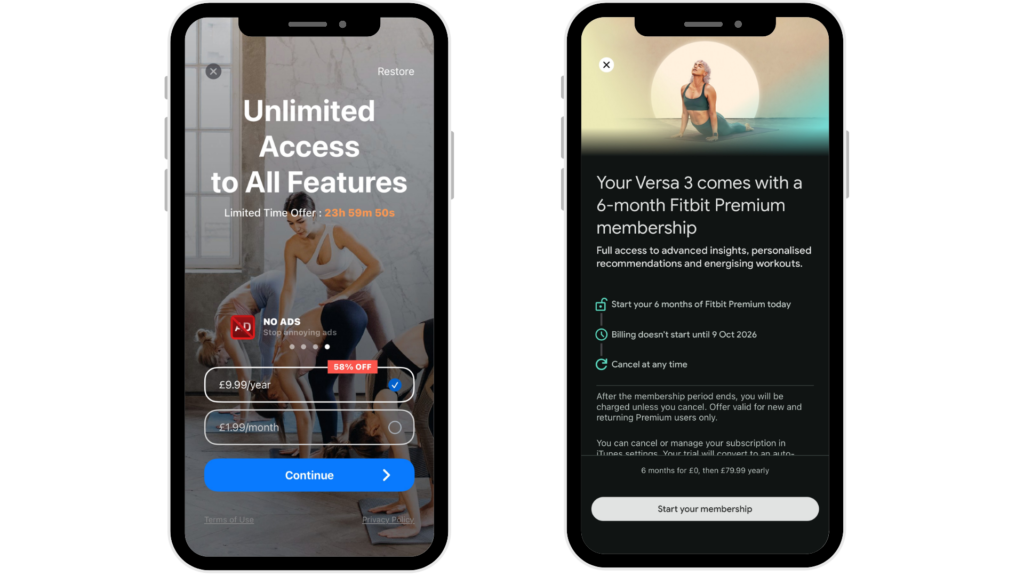
4. Transparent pricing & “best value” call-outs
Display considerations:
- Monthly vs annual plans
- Savings/discount percentages
- Clear selection states
- Social proof
- Price strike-throughs
Note: Anchoring works! Apps offering 3 products vs 2 products see +44% conversion lift, especially when using decoy pricing. For instance, including a 6-month subscription option can help to highlight an annual plan as the most cost-effective option, helping to drive lifetime value (LTV).
5. Compliance & trust signals
Always include:
- Terms & conditions
- Privacy policy
- Restore purchases option
- Cancellation reassurance
Transparency increases perceived legitimacy and brand perception, particularly on iOS, where review guidelines are stricter around deceptive design.
6. Call to action (CTA) copy & colour
Small changes can mean meaningful lift. Test the display with button colours, copy and layout to understand which formats lead to the best engagement.
Testing variations, such as the following, can lead to significant variations in conversion.
- “Start Free Trial”
- “Unlock Premium”
- “Get Full Access”
- “Sign me up”
In addition, testing variations of decline buttons using negative priming can also increase the likelihood of conversion:
- “I don’t want to save…”
- “Keep limited access”
- “Continue without advanced features”
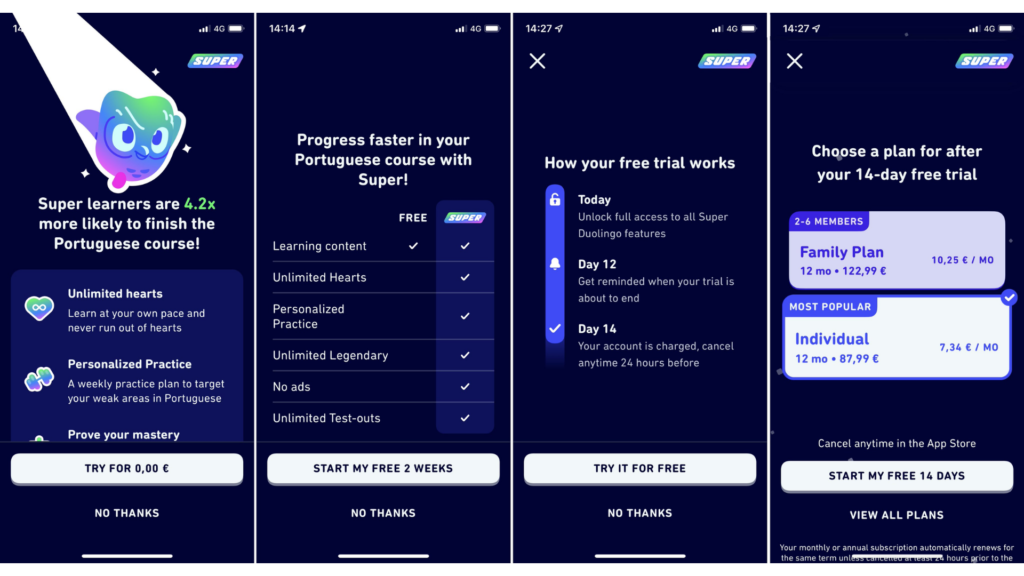
Paywall best practice to move the needle
When defining best practices, it’s important to ground the discussion in data. While every product and audience is different, there are strategic levers that can positively impact paywall conversion. Results of industry testing reveal insights about what tends to work and where teams could focus their experimentation efforts when optimising paywalls.
- Animated elements – +12% to +18% conversion life
- Username personalisation – +17%
- Dynamic/segmented discounts – +35%
- 2 products vs 1 – +61%
- Visible discount percentage – +20-30%
- Free trial toggle – +10-20%
- Trial mentioned multiple times – +15-25%
- Social proof (reviews) – +10-15%
Note: Motion graphics, personalisation, and visible savings consistently outperform static, generic designs.
Paywall placement: Where should it live?
Paywall placement determines when users are asked to pay, and timing directly impacts perceived value.
If a paywall appears before users experience a meaningful benefit, it can create friction and drop-off. If it appears after users recognise value or form early habits, it feels justified and converts more effectively. Design influences how a paywall looks and communicates, and placement determines whether the user is psychologically ready to say yes.
1. Onboarding paywall
This is where most conversions happen.
Why?
- Motivation is highest immediately after installation.
- The product is top-of-mind.
- A free trial feels low risk.
Despite feeling “too early,” onboarding paywalls frequently outperform later placements if done right!
2. Contextual paywall
Triggered when users hit gated features.
Best for:
- Productivity apps
- Creative tools
- Fitness platforms
Provide enough value to build desire for gated features, but not enough to eliminate the urgency to upgrade.
3. “Get now” / upgrade button
This placement works because:
- It creates a persistent upgrade path
- It captures ready-to-convert users instantly
Every subscription app should have a clear, always-visible upgrade route serving as a constant reminder of this option.
Final takeaway
Paywalls are core product infrastructure.
The highest-performing apps don’t treat paywalls as static pricing screens, but as evolving components of their growth strategy. They continuously experiment, refine trial length strategically, and optimise design, psychology, and placement as a holistic process grounded in user data. A paywall is the moment your value proposition is truly tested, and when thoughtfully optimised, it becomes one of your most powerful growth levers.
Our team has worked with many apps, including XY and Z, to build and optimise their paywalls; contact our team here to find out how we can help you.